Eye Strain Simulator Setup
I have been having a hard time as of late. I have realized that I have had a growing dread over time for when I enter my “office” if one can call it that given how its essentially a dungeon with a desk. When I would want to do my development work, game, watch a movie, or sit on call with friends and ragebait the ever living goodness out of them there was always a tinge of brain fog I felt. I am not able to quantify it. This entire blog post will entirely be off how I feel.
I am certain there are studies that dictate in words far more eloquent than my own how your surroundings effect your mental health so I strongly suggest you read some real papers and not just gloss over the abstract if you truly want a few tested facts.
With that said this was what my “office” looked like prior to my efforts of overhauling the space. It was in an unfinished basement of my single family home on an Ikea desk + standing leg combo I made myself (which admittedly is the best part of the setup) in an extremely poorly lit area. The basement is also very cold year round which is nice in the summers but dreadful in the winters.
Yes that is a cooler as a foot rest, yes it was peak
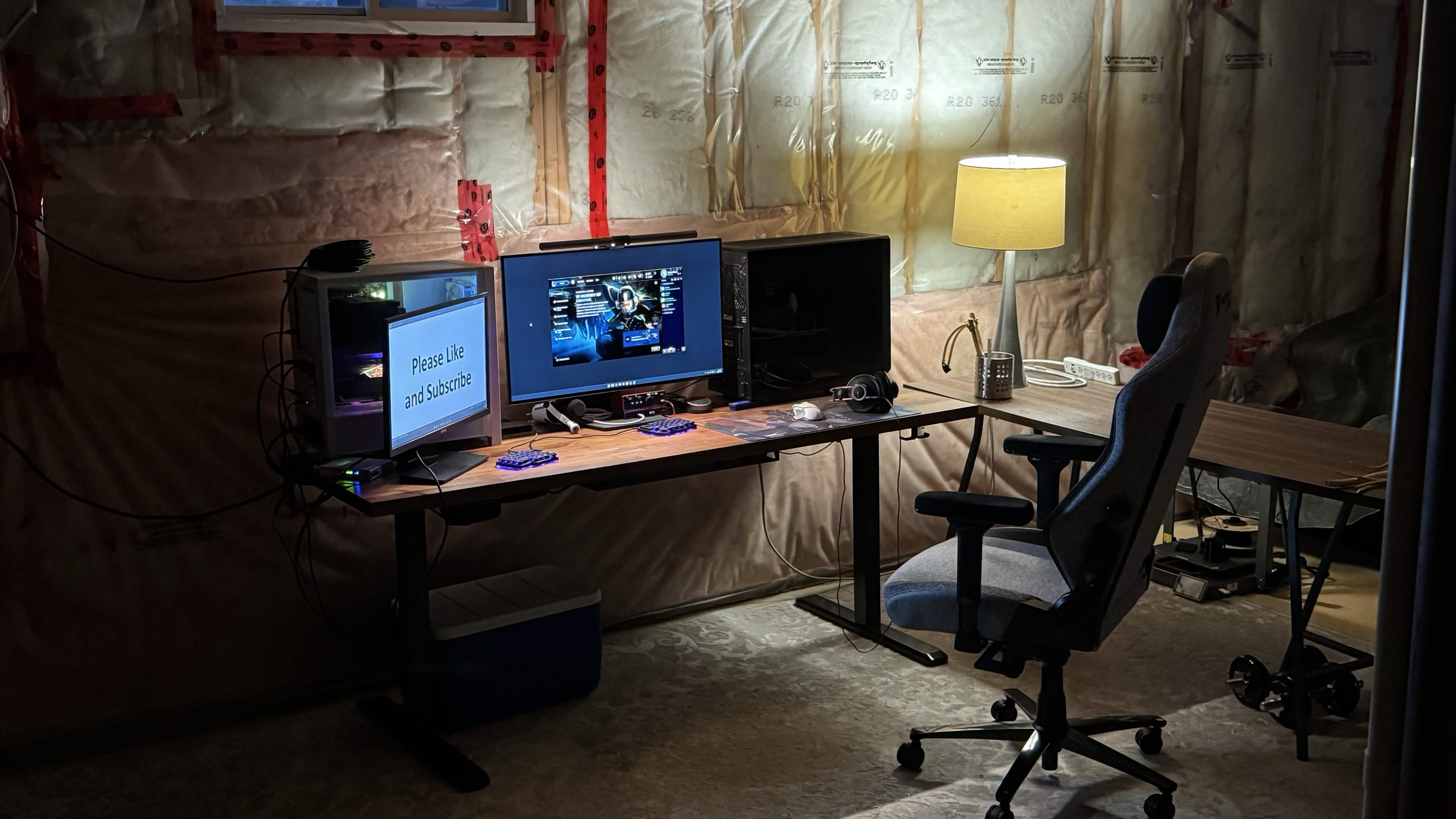
As much time as I was required to spend at my desk I often would hate my time there the moment that the immersion or focus I had on my task at hand was broken. My eyes were also under constant strain given how poorly lit the area was. I attempted to combat this with a lamp I stole from the living room and a light bar for the monitor but it was still a problem.
I also had a bit of complacency with properly updating the space given that I was waiting on a few IRL events to take place before I committed to any upgrades.
Now that you have an idea of what I was working with, why don’t I go over some of the requirements I had for the new setup. Any new space I would put together had to be:
- Highly functional
- All tools should be within arms reach
- Cozy
- Not strain my eyes to regularly be in
- Have personalized decor, I have worked too long in a dungeon
- Extra desk space for hand crafts or computer hardware work
- ACCENT LIGHTING, this is insanely underrated for achieving immaculate vibes
- For the setup to not be in the basement, I need to rejoin society above ground
The Rebuilt Office
First I will go over some of the cool additions,
I moved the entire office into my bedroom. The room was quite small but I had to work with what I had. Right across from the desk is my bed so space is a BIT tight but I like to say its cozy :more copium:
Cozy and not in basement checked!
A lot of the stuff in the room was very jerry rigged together and you wouldn’t believe it.
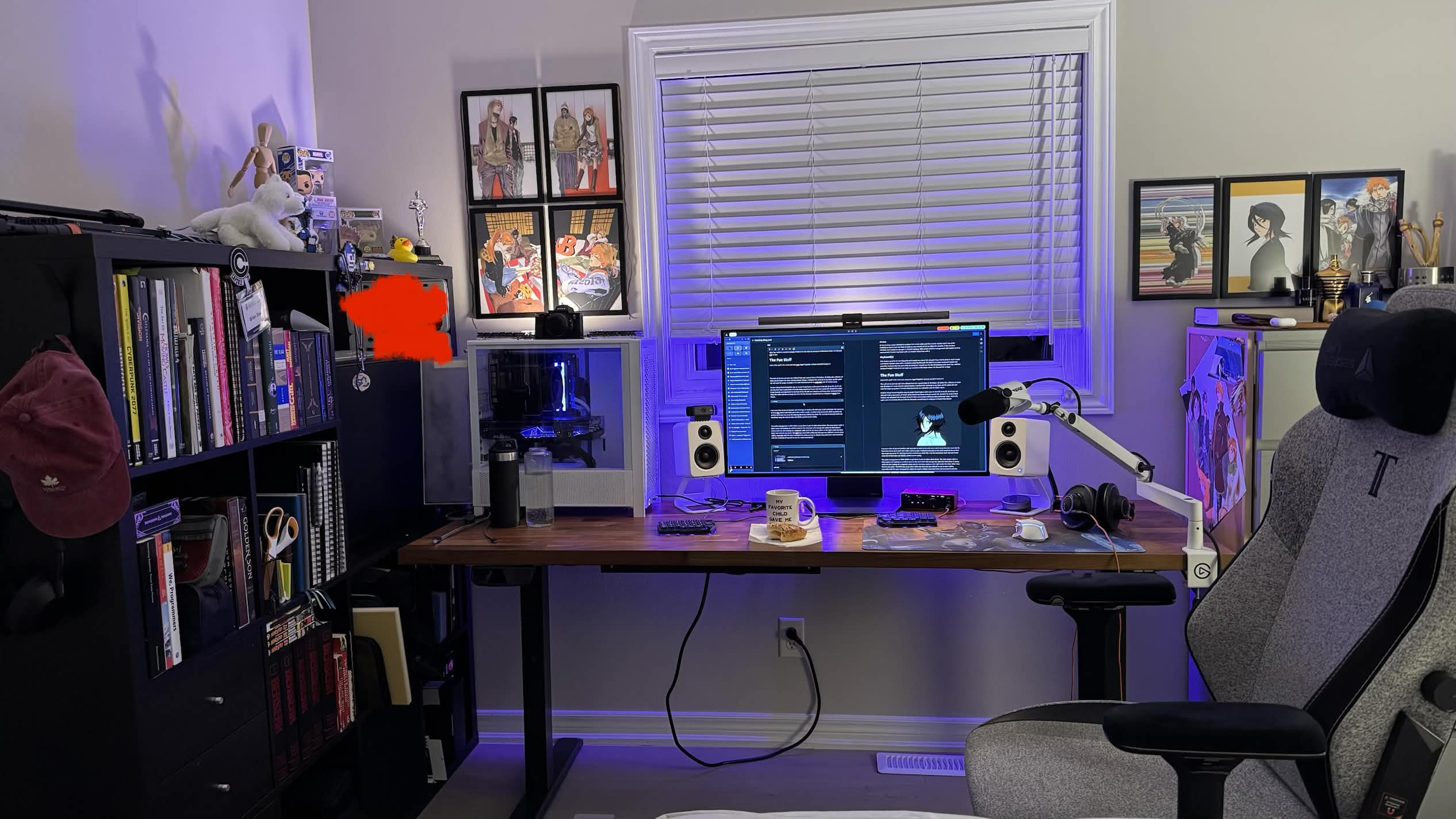
The wall art (as you can see I am a Bleach fan) cost a grand total of 40 dollars. 20 dollars for a Bleach art book and 20 dollars for some amazon picture frames. I clamped the art book to my desk, cut the spine off, and used the pages as posters. I’ve seen individual prints on redbubble cost 20 dollars alone.
Have personalized decor checked!
Another thing I hacked together was an acrylic frosted glass cable cover to the left of my PC. Don’t ask me why but I had a spare piece of acrylic lying around my house and cut a panel off, sanded it to make it look frosted, and attached it to the back of my PC with an L bracket and heavy duty command strips. Hides the cable and since it looks like ice it fits the thematic considering my wallpaper is Rukia from Bleach.

I am sure a ton of you are familiar with that type of shelf on the left now. I can’t remember the name but its from Ikea where each shelf unit is like a cell in a grid. I realized a 2x2 area in the shelf would be the perfect size to put my server PC (that big black box behind my white PC). I cut the horizontal shelf unit and threw away the vertical slats and BOOM, perfect server cubby.
The cable management is VERY GOOD except those 2 sets of cables down there. The main power cable is there cause I am waiting on a UPS to come in the mail and I will manage the cables for that when it arrives and I am also waiting on a magnetic cable arch for the loose cables on the right under the desk. Other than that Its very clean. The VIVO legs came with a little tray that was very difficult to use to store cables, especially with the way I managed the cables so I cut it, drilled a few pilot holes and screwed it onto the underside of my desk to act as a cable cover/shield. I had a spiders web of cables behind my desk for TOO LONG. NO MORE.
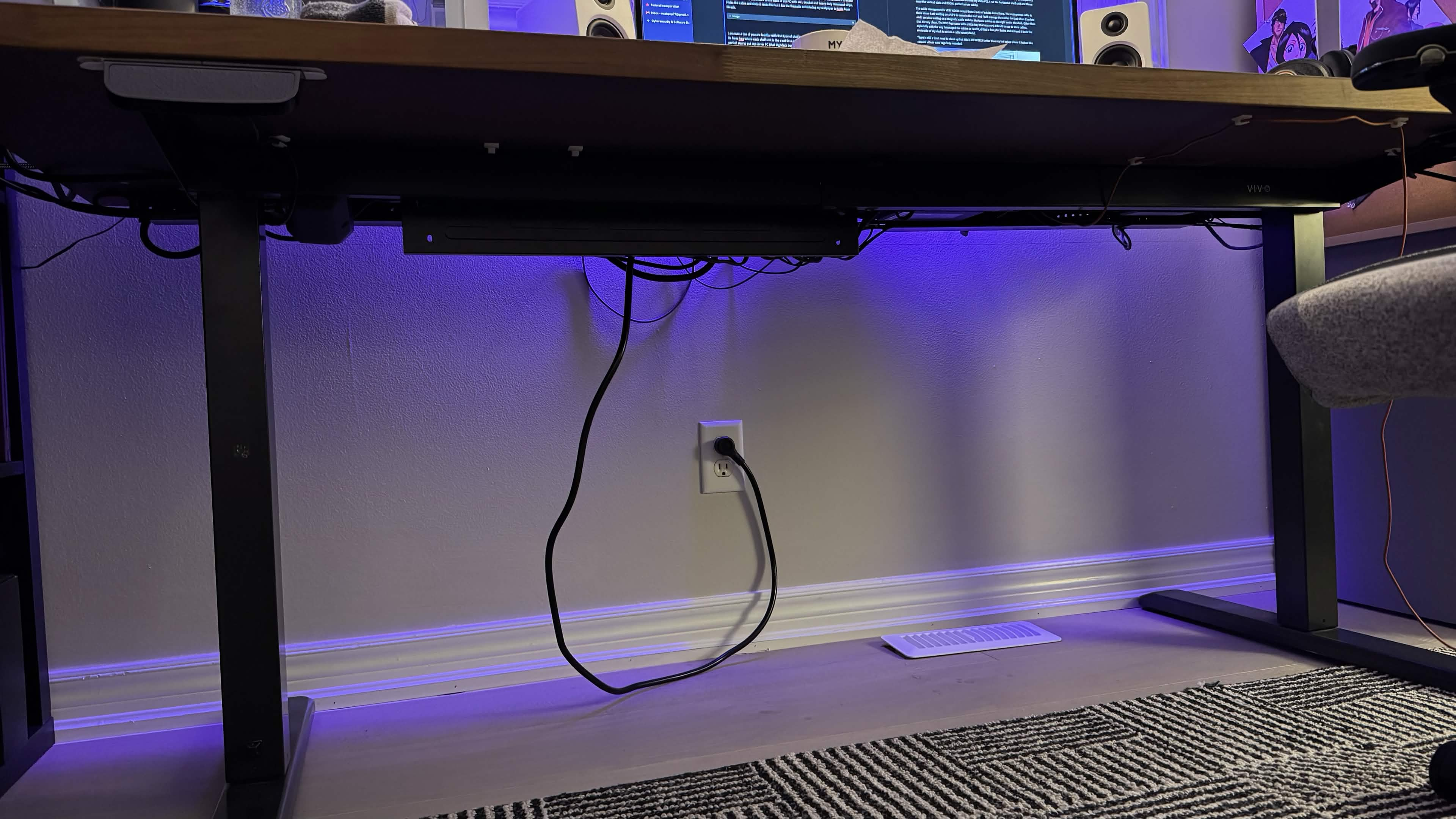
There is still a ton I need to clean up but this is INFINITELY better than my last setup where it looked like ransom videos were regularly recorded.
Reused Gear
There are a few pieces of gear I would like to highlight that I will not be changing at all. In fact there is a lot of stuff I don’t plan on changing to save as much money as possible but I can’t highlight literally everything in the room. I don’t feel like typing for the next 10 hours, sorry 0_0
What I WOULD like to highlight however is the follow.
Desk
The heart of any office or setup in my opinion is the desk. Wildly enough my desk was the one piece of quality furniture I owned outside of my chair. So I had no reason of changing that. It is an IKEA wooden countertop on some very sturdy VIVO standing desk legs. I was thinking about buying a new countertop to get a new feeling desk surface but I kinda liked the fact that the old one was a bit beat up. I would be putting some wear and tear on the top anyway given I often have to mess with a lot of physical hardware and I end up scratching the thing anyway. They are like battle scars of progress :copium:
Chair
Super simple here. Secret Labs Titan Evo in cookies and cream color way. Been using it forever, just gonna keep using it.
Monitors
I have an LG 4k 240hz 32” OLED monitor. Its BEAUTIFUL for movies and games, the 240hz makes using any desktop incredibly smooth, and its a giant monitor meaning tons of space for split screen terminals/browsers.
If you are a monitor nerd and want the exact model its LG ULTRAGEAR+ 405NTBKBJ893
In my previous setup I did have 2 monitors but I never really used the second monitor and it was quite irritating to have to turn my head as much as was required of me to utilize the monitor. It also became infinitely more simple to manage a 1 monitor desktop. With proper window management and a good desktop environment, I found I was faster with a 1 monitor setup than with 2.
Keyboard(s)
This section could be its own blog post and I could rave about this thing for hours but to keep it short I made a partnered Youtube video with a company called Mechboards UK which is a custom keyboard supply and assembly company that has some kick ass products. I myself use the Lily 58 keyboard with silent key switches (ambient twilight I believe) to not wake up everyone in the house when I do Discord PvP at 3am.
Mindset Results
Now with the overall build out of the way I can go over what it has been like to no longer be a mole person underground all day. With the central point of the space being my seat, with a quick swivel I can reach anything I need to in the room, my shelf units, server, books, leather pad to place my EDC on, all my lights, all of it. I also have space to move my keyboard to the side and mess with my notebooks, laptops, server components, all of it.
I believe that checks the Highly Functional box!
Now it is incredibly easy to work on a task that requires a few little things and me to zip around, grab the components in 2 seconds and continue to plow through the work. I am very momentum based where if I get in the groove of working on a problem, I move like a machine. However, if my flow is messed with it takes me a bit to get back into it. This helps with that IMMENSELY.
Another big focus of mine for the space was lighting. I was NOT going to deal with disgusting clinical bright white overhead lighting. I wanted spread out soft lighting in a few key areas with an accent or 2. I have a lamp off to the right providing good flood/room lighting in a soft way. I have two lights on my monitor, one as a lightbar that illuminates my workspace and behind the monitor, and two really powerful Govee RGB light bars I attached to the back of the monitor. Lastly a light on top of my PC to illuminate a dark corner of my room and showcase some of my favorite panels of Bleach art I framed!
Overall the space lighting wise is an insane improvement. I can look to any corner of the room, not have harsh light blaring in my eyes but also see everything clearly. The atmosphere is significantly more chill. Because of this I found that I am a lot more relaxed at my desk. The pain I would feel when staring at my monitor for long periods of time is gone as well. I also look away in the distance to refocus my eyes as a practice to combat eye strain which helps.
No eye strain and accent lighting checked!
Final Thoughts
It feels insanely obvious that a good space promotes good work habits and a good mindset but I have seen too many people with ungodly setups that look like they belong in the background of an internment camp. I am happy I am putting more effort in my work space now, the space is significantly more usable, convenient, immersive, and aesthetic. Because of all that I can:
- Focus for longer periods of time with more clarity
- Feel less distractions and interruptions
- More relaxed in my space
- Grin a bit any time I look at my space knowing “Yeaaa I did that” especially with all of the hacky custom touches looking so good
- I can see sunlight again!
I can’t recommend doing up your own space with whatever you got as well. You don’t need to sink a ton of cash into it if you get a bit creative I promise!